Drawing in 2D
How to draw in the XY or XZ 2D planes.
Sometimes all you have are some 2D coordinates. Sure, you can convert a float2 to a float3 using e.g.new float3(point.x, point.y, 0) , but that's hardly ergonomic. To help you draw using 2D coordinates more easily you can access Draw.xy or Draw.xz.
var p1 = new Vector2(0, 1); When you use Draw.xy or Draw.xz, the code will ensure reasonable defaults are used for those planes. For example, when you draw a circle using Draw.xy, the circle will actually lie in the XY plane. This applies to many things, for example the orientation of arrows, circles, grids, etc.
var p2 = new Vector2(5, 7);
// Draw it in the XY plane
Draw.xy.Line(p1, p2);
// Draw it in the XZ plane
Draw.xz.Line(p1, p2);
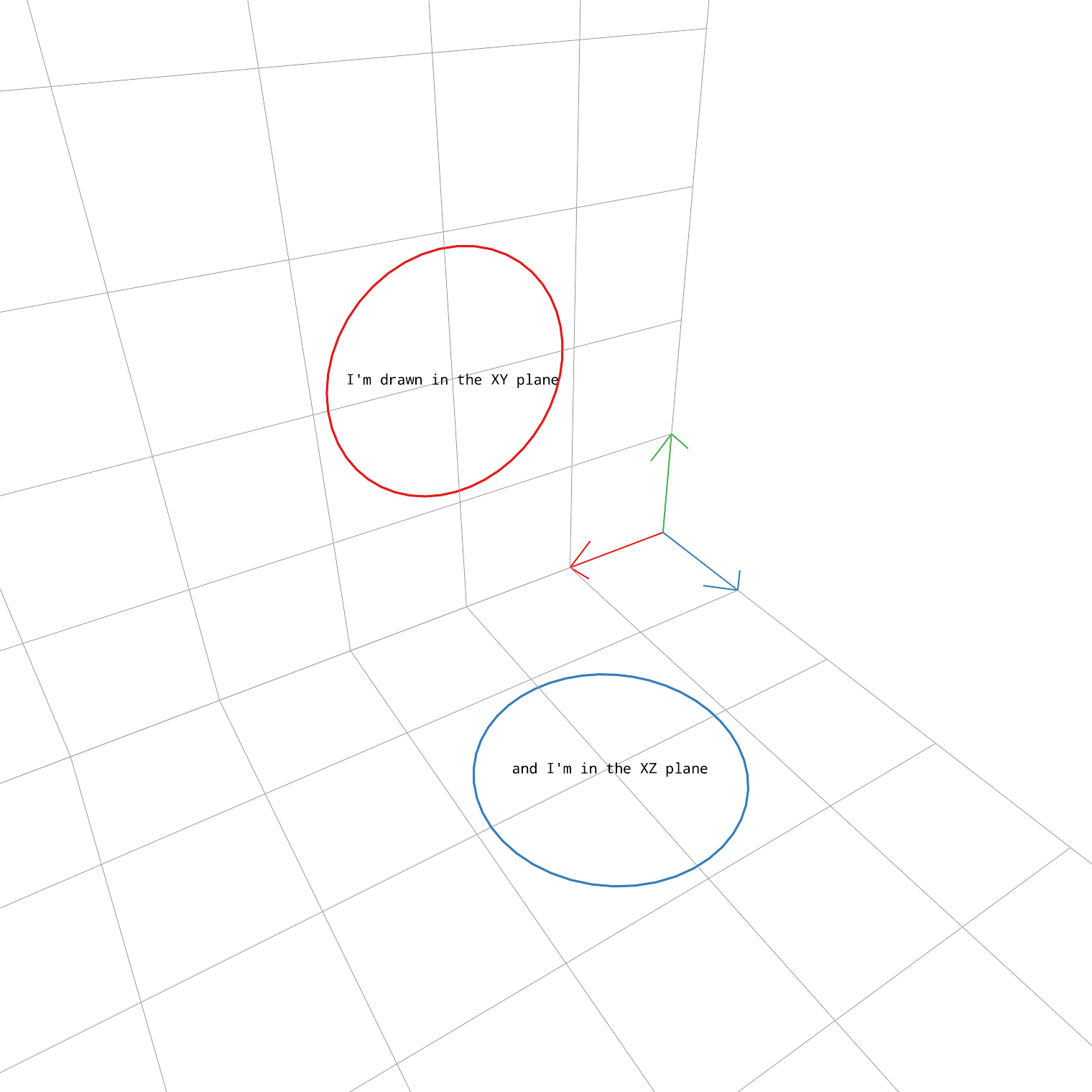
Draw.xy.Circle(new Vector2(2, 2), 0.9f, Palette.Red);
Draw.xy.Label2D(new Vector2(2, 2), "I'm drawn in the XY plane", 20, LabelAlignment.Center, Color.black);

Draw.xz.Circle(new Vector2(2, 2), 0.9f, Palette.Blue);
Draw.xz.Label2D(new Vector2(2, 2), "and I'm in the XZ plane", 20, LabelAlignment.Center, Color.black);